AI Gender Swap, 2026 Edition: From One-Click Filters to Instruction-Following Editors
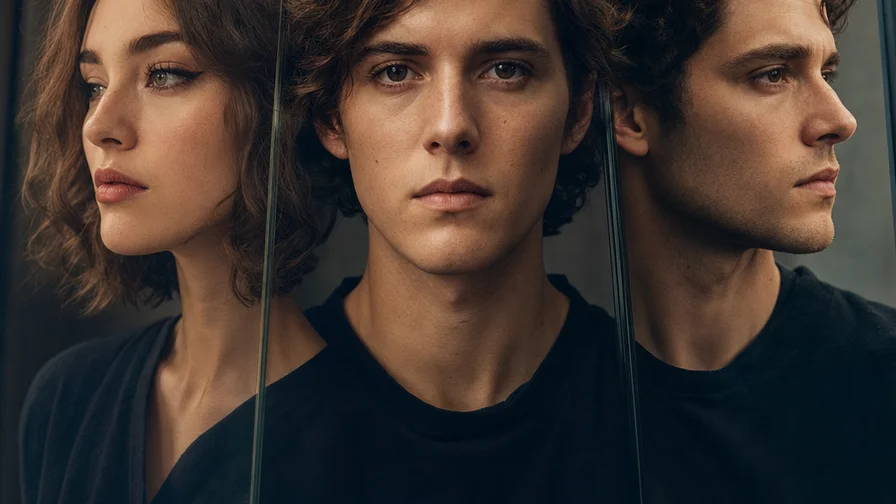
Five years ago, “gender swap” meant running your selfie through a fixed filter. It was fast, but it often warped identity and lighting, and it couldn’t follow detailed instructions. In 2026, the best results come from instruction-following image editors built on diffusion and control layers. On Nexvy, that means the Nano Banana family—responsive editors that read your prompt, respect your photo’s context, and change only what you ask.
The difference shows up immediately. Old-school GAN filters learned a generic “male” or “female” face reshape. They pushed every input toward that average, which flattened unique traits. Instruction-following editors, by contrast, operate more like a skilled retoucher: they can keep the same hairstyle, preserve freckles and bone structure, match the original lighting, and even hold clothing style steady while changing the face’s gender cues. You tell the model what to keep and what to change. It follows.
That control matters for realism and for creative direction. Maybe you want a barely-there shift—softer brows and a subtler jawline, no hair changes, no makeup. Or maybe you’re staging a full cinematic reimagining with a different haircut and period styling. Prompt-based editing lets you set the scope: face-only, face + hair, or a broader makeover. And when you need photorealism that stands up at close inspection, Nano Banana Pro on Nexvy is tuned for that task.
What Prompt-Based Editing Lets You Control
Think of your prompt as a brief to a portrait retoucher. Be explicit about what to preserve and what to update. With the Nano Banana family on Nexvy, you can:
- Preserve identity: Ask to “keep the same bone structure, moles, freckles, eye color, and smile.” This anchors likeness.
- Choose scope: “Face only,” “face and hair,” or “subtle facial feminization/masculinization, no change to hair or outfit.”
- Lock context: “Keep the same pose, lighting, camera angle, and background.” This stops geometry and exposure from drifting.
- Control style: “Photorealistic, editorial portrait” or “painted historical studio portrait.” You can also set makeup level or facial hair.
- Constrain clothing: “Keep the same clothing and fabric details,” or “lightly restyle jacket tailoring, same color palette.”
- Mask areas: When you only want the face touched, apply a face mask so the editor leaves everything else alone.
Step-by-Step: Swap Gender in a Photo on Nexvy
Before you start
Pick a sharp, well-lit photo with clear facial features. Avoid extreme angles if realism is your goal; head-and-shoulders portraits with neutral expressions are the most predictable. If it’s a group shot, plan to mask the face you want edited.
Steps
- 1) Go to nexvy.ai and sign in. New edits start from 60 credits. You can also work inside Telegram via @nexvyai_bot if you prefer chat-based workflows.
- 2) Choose an image editor. Select Nano Banana for fast, high-quality edits. Choose Nano Banana Pro when you want maximum photorealism, skin texture fidelity, and cleaner hairlines.
- 3) Upload your photo. Use a high-resolution source if available. The model can downsample internally, but better inputs preserve micro-details.
- 4) Set edit scope. If you want face-only changes, enable an automatic face mask or paint a quick mask around the face and hairline. Leave clothing and background unmasked to protect them.
- 5) Write a precise prompt. Example: “Change the person in the photo to female, keep the same pose, lighting, background and clothing style, photorealistic. Preserve eye color, freckles, and smile. Minimal makeup.”
- 6) Control intensity. If you see an edit strength slider, start around 25–40% for subtle swaps or 55–70% for a more defined reshaping. You can always re-run at a different strength.
- 7) Generate and review. Check hairlines, eyebrows, jaw contour, and neck transitions. Zoom in on ears and eyeglasses; those are common artifact zones.
- 8) Refine with a second pass if needed. If the first pass nails identity but hair looks off, run a second, hair-focused edit with “keep face as-is” in the prompt. Or invert the mask to clean edges around the neck and collar.
- 9) Export. Save the result, or continue into a style pass (e.g., a soft editorial grade) if you’re preparing a post or pitch deck.
Copy-Paste Prompts You Can Use Today
These are ready to paste into Nano Banana or Nano Banana Pro. Adjust age, makeup, or hair to taste.
- Subtle female swap, keep everything else: Change the person in the photo to female, photorealistic. Keep the same pose, lighting, background, hairstyle, and clothing. Preserve bone structure, freckles, eye color, and smile. Very minimal makeup, natural skin texture.
- Subtle male swap with light stubble: Change the person in the photo to male, photorealistic. Keep the same pose, lighting, background, and outfit. Maintain identity. Add soft jawline definition, light stubble, slightly thicker brows. No change to hairstyle.
- Face-only feminization: Feminize the facial features only, photorealistic. Keep the same hairstyle, clothing, pose, lighting, and background. Preserve all moles and scars. Natural makeup, soft brow shaping.
- Full makeover to male, short hair: Change the person to male, photorealistic. Maintain identity and lighting. Restyle hair to a short fade that matches head shape. Subtle beard shadow, defined jawline. Keep the same jacket and color palette.
- Age + gender combo: Change the person to a 45-year-old female, photorealistic. Same pose, lighting, background, and wardrobe. Preserve identity; add gentle age cues (fine lines, mature skin), natural makeup.
- Historical portrait treatment: Change the person to male, 1890s studio portrait style. Sepia-toned, soft lens falloff, shallow depth of field. Keep identity and pose. Period-appropriate grooming; outfit texture remains modern unless masked.
- Nonbinary androgynous variant: Render an androgynous presentation, photorealistic. Maintain identity, same pose, lighting, background, and outfit. Balance facial traits; no overt facial hair or heavy makeup.
- Targeted edit in a group photo: Edit only the central person: change to female, photorealistic. Keep all other people unchanged. Same lighting and background, preserve identity. Minimal makeup, hair unchanged.
Quality Tips: Preserve Identity, Fix Artifacts, Know When to Re-run
Gender swapping is a surgical edit. These habits keep results tight and realistic.
- Anchor the likeness in your prompt. Explicitly say “keep the same face shape, freckles/moles, eye color, and smile.” If you love a particular feature (gap tooth, dimple), name it.
- Use face-only masks for conservative edits. When you only want facial cues changed, a face mask stops hair, collar edges, and jewelry from drifting.
- Call out lighting and angle. “Same lighting, same camera angle.” This reduces unintended exposure shifts and lens warping.
- Control grooming details. Add or remove “subtle stubble,” “clean-shaven,” “light mascara,” or “no makeup.” Precision beats vague styling words.
- Watch known artifact zones. Hairlines against busy backgrounds, eyeglass frames, earrings, and neck-to-collar transitions can look off. If they do, add constraints like “no extra earrings,” “keep eyeglasses identical,” or run a second pass with a tight hairline mask.
- Fix hair without touching the face. If the face looks perfect but hair frizzes or changes volume, lock the face with “keep face as-is” and mask just the hair. Then request “tidy flyaways, keep original style.”
- Keep clothing consistent. If the model tries to restyle garments, add “keep the same clothing and fabric details; no pattern changes.” For a slight tailoring shift, be specific: “slightly sharper lapels, same color and fabric.”
- Use a two-pass workflow for complex briefs. First pass: identity-safe gender swap. Second pass: styling (hair, color grade, period texture). Small, focused passes compound quality without overcooking the face.
- Scale edits by strength, not adjectives. If it’s “too much,” lower edit strength instead of changing five prompt words at once. If it’s “too little,” bump strength 10–15 points.
- Keep skin texture realistic. For Pro-level detail, include “natural pores, realistic skin texture, no plastic skin.” That helps Nano Banana Pro avoid airbrushed looks.
Fun and Practical Uses That Make Sense
- Social content and storytelling: Post a before/after carousel that shows a faithful, respectful reimagining. Call out that it’s AI-edited to keep it transparent.
- Character design for stories and games: Iterate quickly on a protagonist’s look across genders, then hand off the winning face to your concept artist. Locking pose and lighting keeps continuity.
- Casting visualization and pitch decks: For producers, see how a real person might read on camera with different gender cues, grooming, or age—same blocking, same light—before investing in test shoots.
- Wardrobe and branding explorations: Test tailoring and grooming with controlled gender cues while freezing wardrobe palette and logo placement for brand safety.
- Education and UX research: Build inclusive avatar sets for product trials without reshooting talent, as long as you have consent from everyone involved.
A Note on Ethics, Consent, and Safety
Get permission from the person in the photo before editing. Label AI-edited images clearly, especially in contexts where appearance affects trust—workplace bios, dating profiles, press, and politics. Don’t use gender-swapped images to deceive, harass, or impersonate. Never edit images of minors into adult contexts. If a client or collaborator is unsure, show them the original and the edit side by side and explain your intent.
Nexvy unifies 30+ creative models in one place—image editors like Nano Banana and FLUX, stylers like Midjourney, Ideogram, GPT Image 2 and Seedream, plus video (Veo 3, Kling, Sora 2, Seedance, Hailuo), audio (ElevenLabs, GPT‑4o Audio), and music (Suno, Lyria). That makes it simple to move from a photo edit to a storyboard or a soundbed without juggling accounts.
Ready to try it? Gender swap any photo on nexvy.ai from 60 credits using Nano Banana or Nano Banana Pro, or run the same workflow inside Telegram via @nexvyai_bot. Keep your prompt clear, protect identity cues, and review with care—the best results look like the same person, just seen through a different lens.